The First Five Systems I’d Put Into a Business That’s Been Winging It
Disclaimer: This blog post is intended for informational purposes only and does not constitute legal, financial, visa, or medical advice. Please consult with a qualified professional for advice tailored to your specific situation.
If you’re a female small business owner in Australia who’s been “winging it,” the first five systems you implement will transform your business from a source of stress and chaos into a sustainable, scalable, and compliant operation. These systems—Financial Management & Bookkeeping, Client Relationship Management (CRM), Project & Task Management, Documented Processes & SOPs, and Calendar & Capacity Planning—are your foundation for growth, sanity, and success.

Introduction: Why Systems Matter (Especially for Women in Business)
Let’s be honest: most small businesses in Australia start with a dream, a laptop, and a whole lot of improvisation. You hustle, you juggle, you do “all the things”—and before you know it, you’re drowning in admin, missing deadlines, and wondering if you’ll ever get a real holiday. Sound familiar?
You’re not alone. As of 2026, there are over 2.8 million actively trading businesses in Australia, and a whopping 97% are small businesses with fewer than 20 employees. Women are leading the charge, but we’re also more likely to be unpaid (37.4% of female business owners don’t draw a wage), experience imposter syndrome (16.4% vs 5.8% for men), and face burnout from juggling business, family, and everything else.
The good news? The right systems don’t just save time—they give you clarity, confidence, and the freedom to focus on what matters most. As an Online Business Manager (OBM) who’s helped dozens of women go from “winging it” to winning at business, here are the first five systems I’d put into any business ready to level up.
System 1: Financial Management & Bookkeeping
What It Is
A financial management and bookkeeping system is the backbone of your business. It tracks every dollar in and out, automates invoicing and payroll, ensures you’re ATO-compliant, and gives you real-time visibility into your cash flow.
Why It’s the First Priority
Compliance: Avoid ATO penalties for late BAS, GST, and payroll errors. With the introduction of Payday Super (from 1 July 2026), super must be paid with every pay run, not quarterly. The Super Guarantee is now 12%.
Clarity: Know exactly where your money is, what’s overdue, and what’s coming up.
Time-Saving: Automate bank reconciliation, invoicing, and payroll—freeing up hours each week.
Stress Reduction: No more last-minute BAS panic or lost receipts.
Australian-Recommended Tools & Pricing

How to Implement This Week
Choose Your Platform: Xero suits most service-based businesses; MYOB for complex payroll/inventory.
Sign Up for a Free Trial: Both offer 30-day trials.
Prepare & Import Data: Export your current accounts, contacts, and transactions. Use migration tools or a BAS agent for accuracy.
Customise Chart of Accounts: Tailor categories to your business (not just the defaults).
Connect Bank Feeds: Link all business accounts for automatic transaction import.
Set Up GST/BAS: Configure GST codes and reporting method (cash/accrual).
Add Payroll: Set up employees, pay rates, and superannuation; ensure STP Phase 2 compliance.
Integrate Add-ons: Use Dext for receipt capture if you handle many expenses.
Schedule BAS Lodgement Rhythm: Set calendar reminders for quarterly BAS (28 Oct, 28 Feb, 28 Apr, 28 Jul).
Train Your Team: Use Xero Central or MYOB Academy tutorials.
Review Monthly: Reconcile accounts, check for errors, and monitor cash flow.
Common Mistakes to Avoid
Poor Data Migration: Not cleaning up imported data leads to reporting errors and compliance risks.
Ignoring Chart of Accounts Customisation: Generic categories make reports meaningless.
Delaying Bank Feed Setup: Manual entry increases errors and workload.
Key Finding:
The number one reason small businesses fail in Australia is cash flow mismanagement. Don’t let this be you—get your financial system sorted first.
Have you checked out all the new tools, guides and checklists in our Resource Hub? Explore and download now!
System 2: Client Relationship Management (CRM)
What It Is
A CRM system tracks every client interaction, manages leads, automates onboarding/offboarding, and centralises contracts, proposals, and communications. It’s your “single source of truth” for all things client-related.
Why It’s Essential
Consistency: Standardises onboarding, follow-ups, and offboarding, reducing missed steps.
Visibility: Provides a clear pipeline view—what stage each lead/client is at, and what actions are next.
Efficiency: Automates repetitive tasks (e.g., sending contracts, reminders), freeing up time for higher-value work.
Professionalism: No more lost emails or forgotten follow-ups.

How to Implement This Week
Select Your CRM: HubSpot for free/low-cost and easy Xero integration; Dubsado for advanced automation; HoneyBook for fast onboarding.
Import Contacts: Use CSV import or connect to your email/website forms.
Map Your Pipeline: Define stages (e.g., Lead → Discovery → Proposal → Contract → Onboarding → Active → Offboarding).
Set Up Templates: Create email, proposal, contract, and invoice templates for each stage.
Automate Workflows: In Dubsado/HoneyBook, build automations to trigger emails, forms, and tasks as clients move through stages.
Integrate with Accounting: Connect to Xero/MYOB for seamless invoicing and payment tracking.
Test Onboarding/Offboarding: Run a test client through the full workflow.
Document the Process: Record a screen-share walkthrough or write SOPs for future hires.
Schedule Weekly Pipeline Reviews: Block time to review leads, follow-ups, and client progress.
Common Mistakes to Avoid
Overcomplicating Setup: Too many pipeline stages or automations before validating your actual process.
Not Integrating with Accounting: Leads to double data entry and missed invoices.
Neglecting Offboarding: Missed testimonials, referrals, or compliance steps.
Key Finding:
A CRM isn’t just for big business. Even solo operators benefit from a simple, automated pipeline—especially when juggling multiple clients and projects.
System 3: Project & Task Management
What It Is
Project and task management tools help you plan, assign, track, and complete work—whether solo or with a small team. They centralise to-dos, deadlines, files, and communications, reducing chaos and missed tasks.
Why It’s a Game-Changer
Organisation: Moves you from reactive firefighting to proactive planning.
Accountability: Assigns clear owners and deadlines, making it easy to track progress.
Visibility: Provides a dashboard of all current projects, tasks, and bottlenecks.
Delegation: Makes it easy to hand off work to team members or contractors.
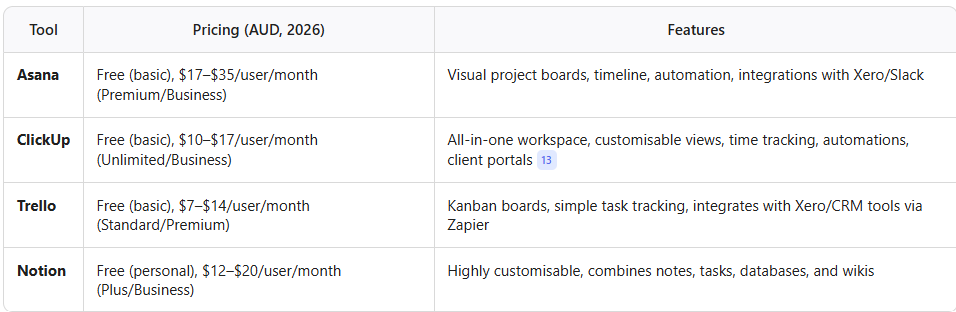
Australian-Recommended Tools & Pricing
How to Implement This Week
Pick Your Tool: Asana for structured teams, ClickUp for all-in-one needs, Trello/Notion for simplicity and flexibility.
Create Your Workspace: Set up your business, invite team members, and define permission levels.
Map Your Projects: List all current projects/clients as boards or folders.
Build Task Templates: Create reusable templates for common workflows (e.g., onboarding, delivery, offboarding).
Assign Tasks & Deadlines: Break projects into actionable tasks, assign owners, and set due dates.
Integrate with Other Tools: Connect to your CRM, calendar, and file storage for seamless workflow.
Automate Recurring Tasks: Use built-in automations for reminders, status updates, and notifications.
Document SOPs: Record a walkthrough or write a quick-start guide for your team.
Schedule Weekly Reviews: Hold a 15-minute check-in to review progress and adjust priorities.
Common Mistakes to Avoid
Overengineering: Overly complex boards or templates that no one uses.
Neglecting Regular Reviews: Letting tasks pile up without weekly check-ins leads to missed deadlines.
Not Assigning Clear Owners: Tasks without owners or deadlines often fall through the cracks.
Key Finding:
Project management isn’t just for “big” projects. Even solopreneurs benefit from a simple, visual system to keep track of client work, admin, and growth projects.
System 4: Documented Processes & SOPs (Knowledge Hub)
What It Is
Documented processes and Standard Operating Procedures (SOPs) are step-by-step guides for how things get done in your business. A knowledge hub (like Notion or Google Workspace) is your “single source of truth” for all SOPs, checklists, templates, and training materials.
Why It’s Critical
Consistency: Ensures tasks are done the same way every time, regardless of who’s doing them.
Delegation: Makes it easy to hand off work to team members or contractors.
Onboarding: New hires get up to speed faster, reducing training time.
Scalability: Your business can grow without everything depending on you.
Australian-Recommended Tools & Pricing

How to Implement This Week
Start with High-Impact Tasks: Document high-frequency, high-stakes, or delegation-ready processes first (e.g., invoicing, client onboarding, BAS lodgement).
Choose Your Hub: Notion for flexibility and linking; Google Workspace for simple docs; Loom for video walkthroughs.
Create Simple SOPs: Use checklists, step-by-step guides, and visuals (screenshots, videos).
Assign Ownership: Each SOP should have a named owner responsible for updates.
Centralise Everything: Store all docs in a single, searchable hub—your “single source of truth.”
Embed in Workflow: Link SOPs in onboarding flows, Slack channels, or dashboards.
Schedule Reviews: Set quarterly reminders to update and improve documentation.
Gather Feedback: Enable users to flag issues or suggest edits.
Common Mistakes to Avoid
Over-documenting: SOPs that are too complex or detailed to follow.
Not Updating: Outdated SOPs lead to errors and confusion.
No Central Hub: Scattered docs mean no one knows where to find the latest version.
Key Finding:
Businesses with a centralised knowledge hub onboard new hires 50% faster and reduce owner dependency—making holidays (and sick days) possible.
System 5: Calendar & Capacity Planning
What It Is
A calendar and capacity planning system is more than just a diary. It’s a proactive approach to managing your time, protecting your focus, and ensuring you never overcommit. It includes scheduling tools, time-blocking, and recurring “CEO Day” or review meetings.
Why It’s a Must-Have
Prevents Burnout: Protects your time and energy by matching workload to real capacity.
Professionalism: No more double-bookings or missed appointments.
Predictability: Recurring rhythms (weekly CEO review, admin blocks) create structure and reduce decision fatigue.
Delegation: Makes it easy for team members or clients to book time with you.
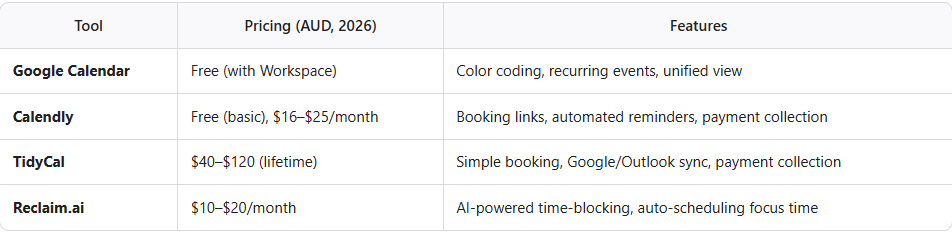
Australian-Recommended Tools & Pricing
How to Implement This Week
Set Up a Unified Calendar: Consolidate all work, personal, and client events into one calendar.
Color Code Events: Use a standard scheme (e.g., red for urgent, blue for routine).
Time Block Your Week: Allocate blocks for deep work, meetings, admin, and personal time.
Automate Scheduling: Use Calendly or TidyCal booking links to eliminate back-and-forth.
Add Recurring Rhythms: Schedule a weekly “CEO Day” for review and planning, plus regular admin and team check-ins.
Build in Buffer Time: Add 15-minute buffers before/after meetings.
Review Weekly: Audit your calendar to optimise and adjust as needed.
Capacity Planning: Match workload to real availability—say no to overcommitment.
Common Mistakes to Avoid
Not Syncing Calendars: Leads to double-bookings and missed details.
No Buffer Time: Back-to-back meetings increase stress and reduce productivity.
Ignoring Capacity: Overcommitting leads straight to burnout.
Key Finding:
Businesses that implement time-blocking and recurring “CEO Days” report higher productivity and lower burnout—especially among women juggling multiple roles.
Before & After: The Power of Systems

Australian Context: Why This Matters in 2026
2.8 million actively trading businesses, 97% are small businesses.
30.3% churn rate—businesses opening or closing within a year.
Female business owners are more likely to be unpaid, experience imposter syndrome, and face burnout.
Compliance is complex: BAS quarterly lodgement, Payday Super, STP Phase 2, ATO 5-year record retention, Fair Work 7-year payroll retention, Super Guarantee at 12%.
Digital transformation: Cloud-based, automated systems are now the norm; manual record-keeping is no longer sufficient.
OBM and VA sector is booming: More women are outsourcing admin, bookkeeping, and business management to focus on growth.
OBM Vocabulary Cheat Sheet
CEO Day: A dedicated weekly block for strategic review and planning.
Operational Rhythm: Recurring schedule of meetings, reviews, and focus blocks that structure your week.
Single Source of Truth: Centralised, authoritative documentation hub (e.g., Notion, Google Workspace).
Operational Playbook: Collection of SOPs, checklists, and templates for recurring business activities.
Capacity Planning: Matching workload to available time/resources to prevent burnout.

Conclusion: Your Next Steps
If you’ve been “winging it,” you’re not alone—but you don’t have to stay there. The first five systems—Financial Management & Bookkeeping, CRM, Project & Task Management, Documented Processes & SOPs, and Calendar & Capacity Planning—are the foundation of a business that works for you, not the other way around.
Start small. Pick one system to implement this week. Use the tools and steps above. Don’t aim for perfection—aim for progress. And remember: every system you put in place is a step toward more freedom, less stress, and a business that can grow with you.
Final Takeaway:
Systems aren’t about bureaucracy—they’re about building a business (and a life) you love. You deserve it.
Ready to stop winging it and start winning at business? Book your systems together!
There are many ways of working with professionals. Start small, but keep it regularly and don’t wait until something happens. Strategic planning and periodic reviews are a great start to implement those strategies.
Perfectly Organised NT can assist with a financial review and strategic business planning & management. Find out more!

Perfectly Organised NT - helping small business owners in Australia manage their business.